
Winterfest Skin Progress Tracker

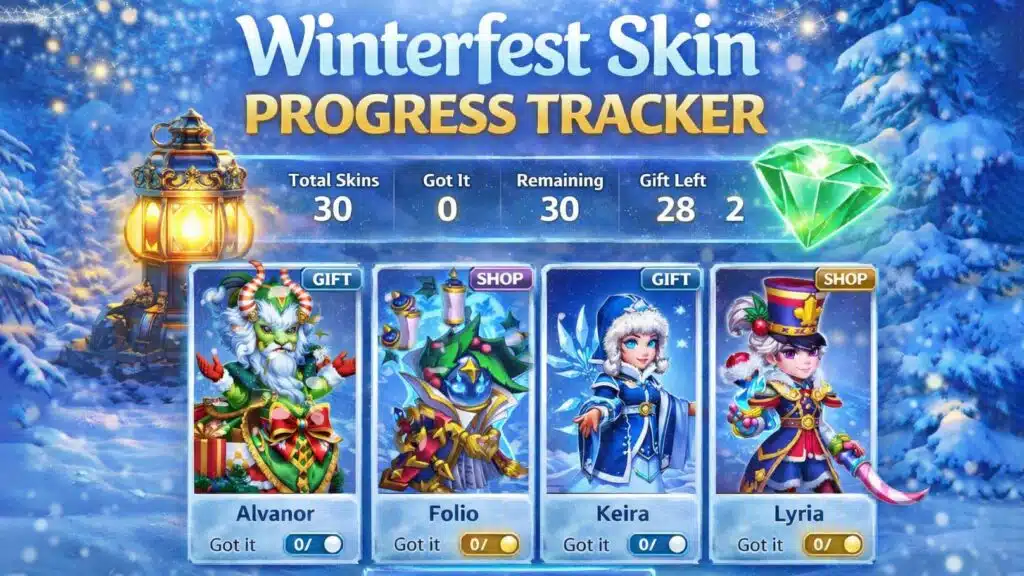
Winterfest is one of the most rewarding events in Hero Wars, but it is also one of the most confusing when it comes to tracking skins. With dozens of heroes, multiple acquisition sources, and limited-time availability, many players lose clarity about what they already have and what is still obtainable.
The Winterfest Skin Progress Tracker was created to solve exactly that problem. It does not replace the game interface. Instead, it gives players a clear, global overview that the game itself does not provide.
This page explains how the tracker works, what each section means, and how to use it efficiently.
🎄 Winterfest Skin Progress Tracker
What the Winterfest Skin Progress Tracker Is
The Winterfest Skin Progress Tracker is a state-based tracking tool.
Its purpose is simple:
to show your personal Winterfest skin situation in one place.
Instead of opening heroes one by one and relying on memory, the tracker lets you see:
- which Winterfest skins exist
- where each skin comes from
- which skins you already obtained
- which skins are still available to you
The tool is designed to reduce mental load and prevent mistakes during the event.
Why This Tool Is Needed
In Hero Wars, Winterfest skins are spread across:
- Winterfest Gifts
- the Winterfest Shop
The game does not provide a single list that shows all Winterfest skins together.
It also does not show which skins are gift-only and which are shop-only in one overview.
Because of this, many advanced players create spreadsheets or notes to track their progress.
The Winterfest Skin Progress Tracker replaces that manual work with a clean, visual solution.
Understanding the Core Structure
One Card Per Hero
Each Winterfest skin is displayed as a card.
Every card represents exactly one hero and one Winterfest skin.
On each card, you will see:
- the Winterfest skin image
- the hero name
- the acquisition source
- a “Got it” toggle
There are no stats, no calculations, and no unnecessary information.
The focus is clarity.
Gift vs Shop – What the Source Means
Each Winterfest skin has a predefined source.
This information is locked and cannot be changed by the user.
Gift Skins
Skins marked as Gift can be obtained from Winterfest Gifts.
If a skin is labeled Gift, it means:
- it can drop from gift openings
- you do not need to buy it directly from the shop
Shop Skins
Skins marked as Shop do not drop from gifts.
They are only obtainable through the Winterfest Shop.
This distinction is critical.
It prevents players from wasting resources chasing skins that will never drop from gifts.
The “Got It” Toggle – Your Personal Progress
The only interactive element on each card is the Got it toggle.
When you activate it:
- the skin is marked as obtained
- the card visually changes
- the summary counters update automatically
You can toggle it on or off at any time.
This allows you to correct mistakes or reset decisions as needed.
Your progress is saved automatically in your browser using local storage.
The Summary Panel Explained
At the top of the tracker, you will find a summary panel.
This panel gives you instant insight into your overall progress.
It shows:
- total number of Winterfest skins
- how many you already obtained
- how many are still remaining
- how many Gift skins are left
- how many Shop skins are left
This is the most important part of the tool.
It answers the question players care about most:
“Where do I stand right now?”
Using Filters to Focus Your Decisions
The tracker includes filters that help you focus on what matters.
You can filter by:
- all skins
- skins not yet obtained
- Gift-only skins
- Shop-only skins
- skins already marked as Got It
Filters do not change data.
They only change what is visible on the screen, helping you make decisions faster.
Export, Import, and Reset Options
The tracker allows you to:
- export your progress as a JSON file
- import progress on another device
- reset all progress if needed
This is especially useful for players who switch devices or want to keep a backup of their progress.
What This Tool Is Not
The Winterfest Skin Progress Tracker is not:
- a skin encyclopedia
- a stat comparison tool
- a calculator
- a replacement for the in-game interface
It exists for one reason only:
to give you clarity and confidence during Winterfest.
Final Thoughts
Winterfest is about choices.
Which skins to chase, which to skip, and when to stop.
The Winterfest Skin Progress Tracker helps you make those choices based on clear information, not memory or guesswork.
If you know what you already have and what is still available, you finish the event stronger and with no regrets.
That is exactly what this tool was built for.
Check also other tools Like : Hero Wars Titan Planner , Hero Wars Events Calendar , Hero Counter Tool , War Flag Pattern Calculator , Area of Conquest, The Great Storm Calculator, Hero Wars Glyph Calculator
You can explore more about the Hero Wars universe and its full roster of heroes on the official Hero Wars site